Picture Booth: What It Is and How It Works
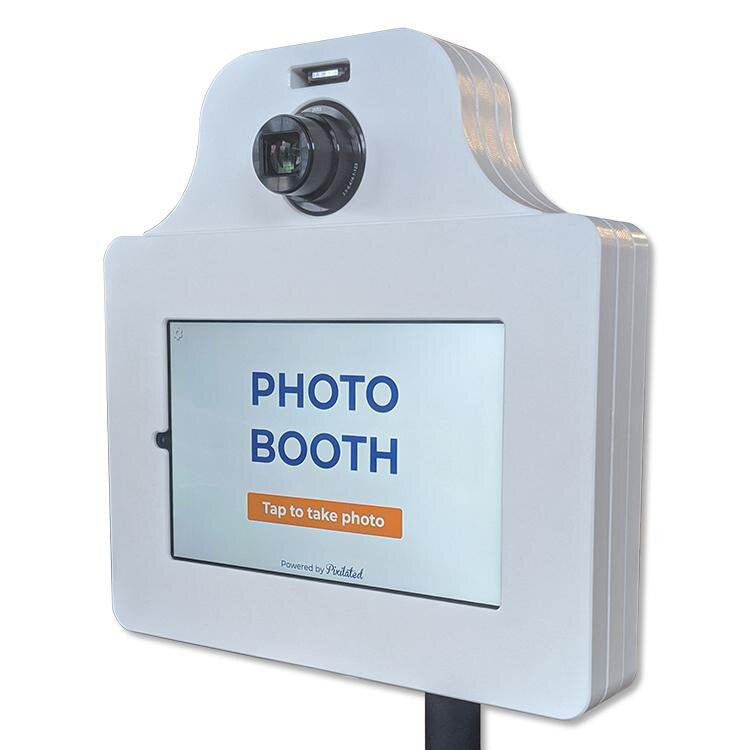
Pixilated Photo BoothA picture booth is a self-contained setup that lets guests take their own photos at an event, usually by pressing a button, posing for a short countdown and receiving the images instantly. Modern versions combine a camera, a touchscreen, lighting and software, and they deliver photos by text, email or an online gallery instead of a printed strip alone.
For couples planning a reception, corporate teams hosting a party or student groups running a campus event, the picture booth has become a standard way to give guests something to do and give hosts a collection of candid, shareable images. This article explains what a picture booth is, how the technology works, which formats exist and how to choose one that fits your event.
What Is a Picture Booth?
A picture booth is a camera station designed for guests to operate themselves, producing photos or short clips without a photographer present. The concept descends from earlier coin-operated photo kiosks that produced photo strips inside a curtained cabin. Today the term covers a much wider range of equipment, from enclosed cabins to open-air stands to apps that run on a tablet.
The core idea has stayed the same. A guest steps up, the booth counts down and the photos are captured. What has changed is everything around that moment: the image quality, the branding options and the way photos reach guests afterward.
The Parts of a Modern Setup
According to Foto Master's privacy FAQ, a typical digital booth setup can include a booth computer or supported device, a camera, booth software, an optional cloud connection and an optional printer. Each part has a clear job:
- Camera and lens: captures the image, often a DSLR-grade or high-resolution tablet camera.
- Display: shows the countdown and a live preview so guests can frame themselves.
- Lighting: a ring light or built-in LED panel keeps faces evenly lit in dim venues.
- Software: controls the countdown, applies frames and filters, and routes the finished images.
- Delivery layer: sends photos by text, email, QR code or an online gallery.
- Printer (optional): produces physical prints or strips on the spot.
How a Picture Booth Works Step by Step
A picture booth works by running a short, repeatable sequence: it detects a guest, captures images on a timer, applies a branded template and delivers the result. The whole cycle is quick, which helps keep lines moving at a busy reception or conference.
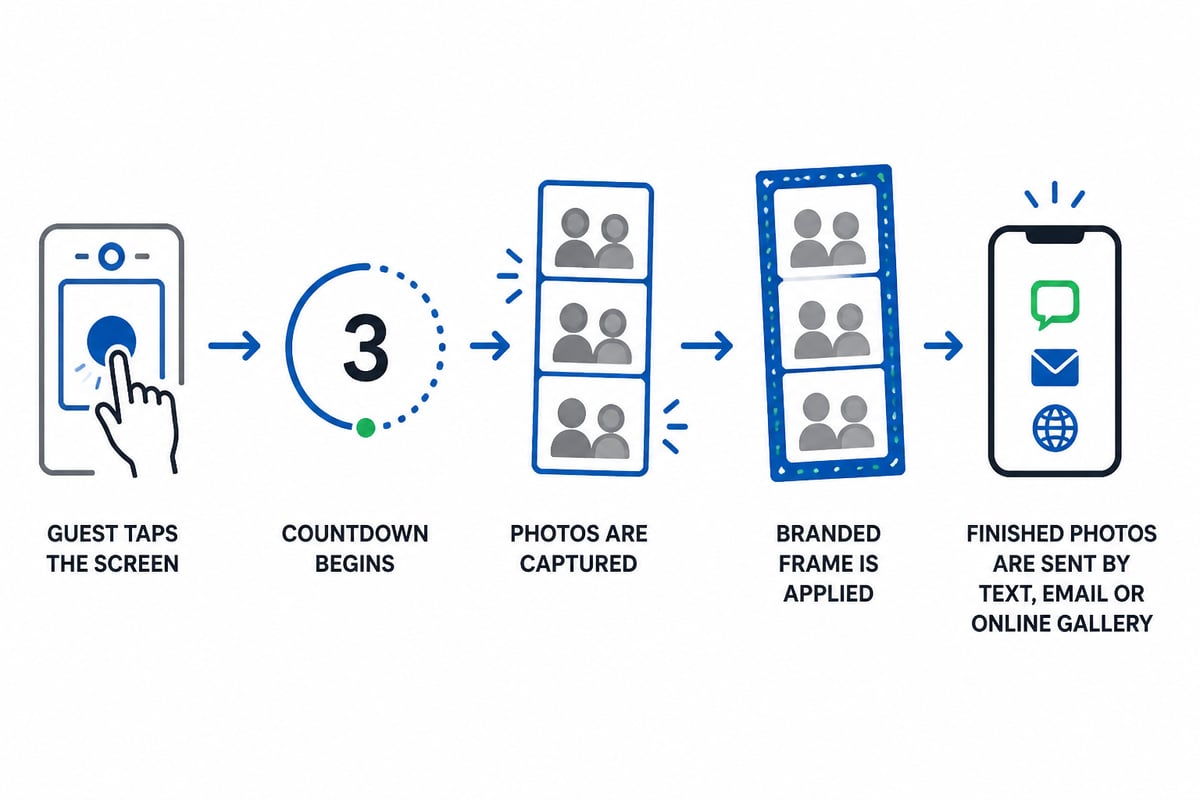
- Guest starts the session. A tap on the screen or a button press begins the sequence.
- The countdown runs. A short countdown gives everyone time to pose.
- Images are captured. Depending on the mode, the booth takes a single photo, a strip of several shots, a burst for a GIF or a short video.
- The template is applied. The software adds the event frame, logo, date or custom message.
- Photos are delivered. Guests enter a phone number or email address, or scan a code, and receive their images.
- The host collects everything. All photos are stored in a shared gallery for after-event downloading.
Why Battery Power Matters
Power cords are the most common practical problem at venues. A cord across a dance floor or a ballroom aisle is a trip hazard and limits where the booth can sit. Battery-powered booths remove that constraint and let you place the booth near the action instead of near an outlet.
Types of Picture Booths
Picture booths fall into four main formats: enclosed cabins, open-air booths, mirror booths and tablet-based kiosks. Each suits a different venue size, budget and level of staffing.
| Format | How it works | Typical fit |
|---|---|---|
| Enclosed cabin | Curtained box with seat, camera and flash | Vintage-style events with dedicated floor space |
| Open-air booth | Camera on a stand with a backdrop | Weddings, receptions, corporate parties |
| Mirror booth | Full-length touchscreen mirror with prompts | Upscale events, brand activations |
| Tablet kiosk | Tablet or screen on a stand with software | Conferences, campus events, tight spaces |
For most hosts, the open-air and tablet formats offer the best balance. They need little floor space, they are quick to set up and they let groups of eight or ten people fit into the frame, which an enclosed cabin cannot do.
Photo, GIF and Video Modes
Many booths now offer more than still photos. A GIF photo booth captures a short burst of frames and loops them into a shareable animation, while video modes record a few seconds of footage. These formats tend to travel further on social media because they move, which matters for corporate hosts who want guests to tag a company account. The GIF photo booth guide covers how the format works in more detail.
Picture Booth Examples at Real Events
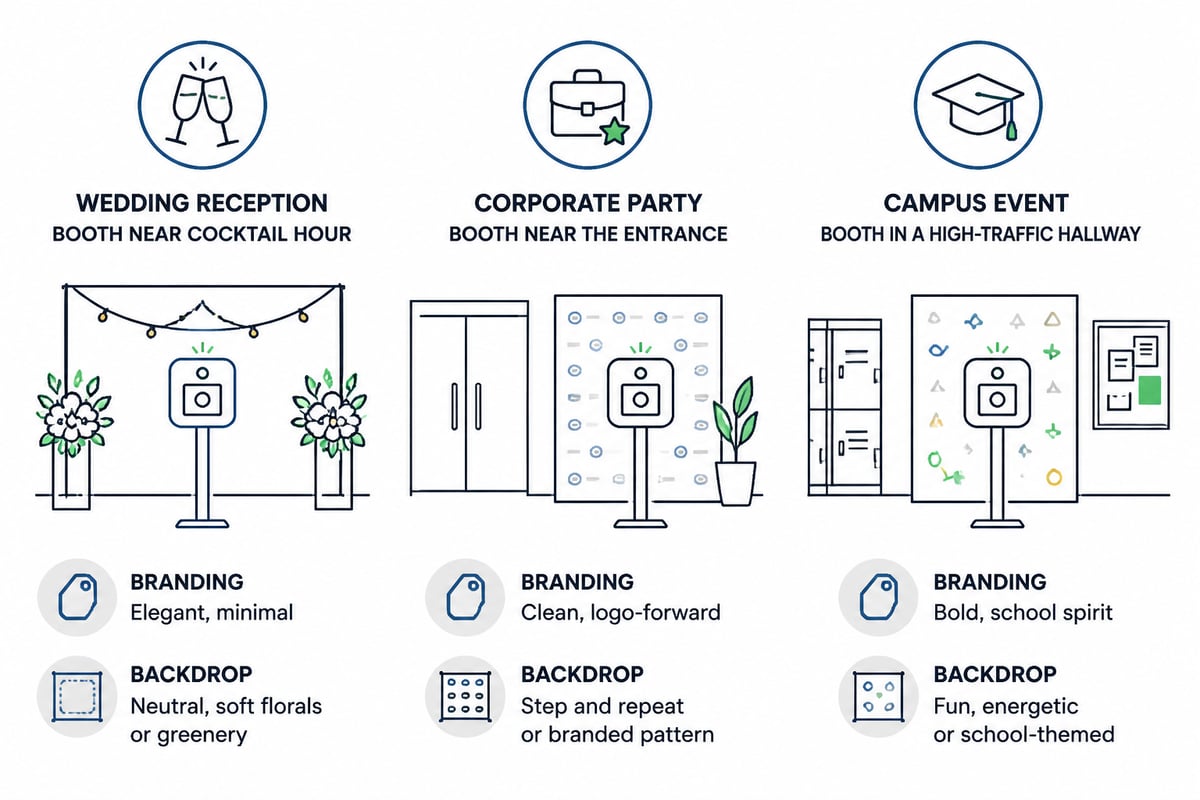
A picture booth adapts to the event it serves, and the clearest way to see this is through concrete situations. The examples below are hypothetical scenarios.
Hypothetical example: wedding reception. A couple might place the booth near the cocktail hour area so guests visit it before dinner. The frame carries the couple's names and date, and props match the color palette. After the event, the couple can receive the full gallery of candid shots. Themed props, such as a wedding photo booth props set, give shy guests something to hold.
Hypothetical example: company holiday party. An HR team might set up the booth near the entrance so each employee passes it on arrival. The frame carries the company logo and a seasonal message, and the shared gallery becomes material for the internal newsletter. A company holiday party photo booth bundle packages the props and branding together.
Hypothetical example: campus orientation or graduation. A student group might place the booth in a high-traffic hallway or reception space. School colors and a mascot backdrop turn each photo into a keepsake. School photo booth bundles are built around this kind of use.
Why a Picture Booth Matters for Your Event
A picture booth matters because it gives guests a reason to interact, and it hands the host a set of images that guests actively want to share. Unlike a hired photographer, who captures what the host directs, a booth captures what guests choose to do when no one is watching.
The benefits break down into a few practical areas:
- Engagement: guests who might not dance or mingle often gather around the booth.
- Shareable content: photos arrive on guests' phones within moments, which extends the event's reach.
- Branding: frames, screens and backdrops carry a logo, color scheme or theme.
- Keepsakes: couples and hosts receive a complete gallery of candid images.
- Low supervision: a self-service setup does not need an operator standing by.
Hosts who want a staffed attendant to run the booth and direct guests should look at a different service model. A self-service picture booth works best when guests are comfortable with a touchscreen and the host does not need an operator on site.
Choosing a Picture Booth: What to Compare
The right picture booth depends on setup time, branding control, delivery options and venue constraints, so compare those four areas before booking. Asking the same questions of each provider makes the answers easy to line up.
Setup and Ease of Use
Ask how long setup takes and whether it requires technical skill. A booth that assembles quickly and needs no technical background is practical for a wedding planner or a student coordinator who has other tasks on event day. Check also how the booth is delivered and returned, since shipping timing affects your schedule.
Customization
Look at what you can brand. A strong setup lets you change the frame, the on-screen messages and the backdrop to match your logo, colors and theme.
Delivery and Gallery
Confirm how guests receive their photos. Text and email delivery, together with an online gallery of every image, covers most needs. Some events also want physical prints, which may be available as an add-on.
Cost
Pricing varies by format, length of rental and add-ons. Compare the full price including shipping, props and any printing, not just the base rental fee.

Privacy and Data Considerations
A picture booth can collect more than photos, so hosts should know what is gathered and how it is handled. According to Foto Master's privacy FAQ, depending on the workflow a booth may collect photos or videos, guest email addresses or phone numbers, form responses and event-related metadata.
This matters most for corporate and campus events, where attendees may have expectations about how their contact details are used. A few practical steps help:
- Tell guests clearly what they are entering their phone number or email for.
- Avoid collecting more information than you need.
- Decide in advance how long the gallery stays online.
- Confirm how the provider stores and deletes images after the event.
For events with attendees in Europe, the GDPR distinction is useful. As Camfetti's GDPR event data privacy guide explains, a photograph is not automatically biometric data under the GDPR; it becomes biometric data when processed by specific technical means to uniquely identify or authenticate a person. A plain photo booth that captures and delivers images generally does not fall into that category, but a booth that adds face-matching features would.
Accessibility at the Booth
A picture booth should be usable by every guest, and that depends on layout as much as equipment. Placement, flooring, height and queue space all affect who can take part.
Practical guidance from Xbox's accessibility documentation for attractions and activations covers queues, ramps, flooring, sound and sensory considerations, and it applies well to photo booths. For specific suggestions such as wheelchair access, adjustable equipment and seating, this inclusive photo booth guide offers a useful checklist.
In practice, a few decisions make the biggest difference:
- Place the booth on level, uncluttered flooring with room for a wheelchair to turn.
- Set the camera and screen at a height that works for seated and standing guests.
- Keep the queue wide enough for mobility aids.
- Use clear, large on-screen prompts with good contrast.
- Keep music and flash levels in mind for guests with sensory sensitivities.
A Self-Service Option for Weddings, Offices and Campuses
For hosts who want a self-service format without hiring an operator, the Pixilated Photo Booth is built around simple setup and instant digital sharing. The kit is battery powered, so there are no cords to manage, and its frames, screens and backdrops can carry your logo, colors and theme. Photos reach guests by text and email, and every image also goes into an online gallery. The company reports a strong rating from event hosts and has run many events.

Pixilated ships its kits to customers, and shipping details are available on its rental pages.
Related Terms
Several terms overlap with picture booth, and knowing them helps when comparing providers.
- Photo booth: the most common alternative name, used interchangeably with picture booth.
- Photo kiosk: a stand-alone station, often tablet based, used at events and in retail.
- Mirror booth: a touchscreen mirror that guides guests through the session with animated prompts.
- GIF booth: a booth that outputs looping animations in place of still strips.
- Video booth: a station that records short clips or messages.
- Virtual photo booth: an online version that guests use from their own devices, useful for remote or hybrid gatherings.
- DIY photo booth: a setup you assemble yourself, from a basic backdrop and phone to a full kit.
Frequently Asked Questions
Does a picture booth need an operator?
Not a self-service one. Guests start the sequence themselves, and the software handles the countdown, template and delivery. A staffed booth with an attendant is a separate service.
How many people fit in one photo?
It depends on the camera angle and backdrop width. Open-air and tablet formats usually handle larger groups than enclosed cabins, which suits wedding parties and team photos.
Can the booth match my event theme?
Most modern booths allow custom frames, screens and backdrops. Themed prop sets and backdrops, such as the curtain photo booth backdrop, make it easy to tie the booth into your decor.
How do guests get their photos?
Delivery by text, email, QR code or online gallery is standard. Confirm the options with your provider before the event.
Start by listing the three things your booth must do at your event, such as carry a logo, fit large groups or run without an outlet, and use that list to compare providers. Pixilated Photo Booth ships a self-service kit to the lower 48 states with free roundtrip shipping, and you can see the Pixilated Photo Booth setup in full before you decide. When you are ready to reserve one for your wedding, company party or campus event, book my photo booth now through the Pixilated rental page.